

Why Image Mirroring?
Image mirroring serves two main purposes:- Speed up deployments: By caching built images, Qovery avoids rebuilding identical images, significantly accelerating the deployment process
- Secure scale-up operations: When Kubernetes needs to scale up your application and create additional instances, having images stored locally ensures the operation succeeds even if the third-party registry is unavailable
How It Works
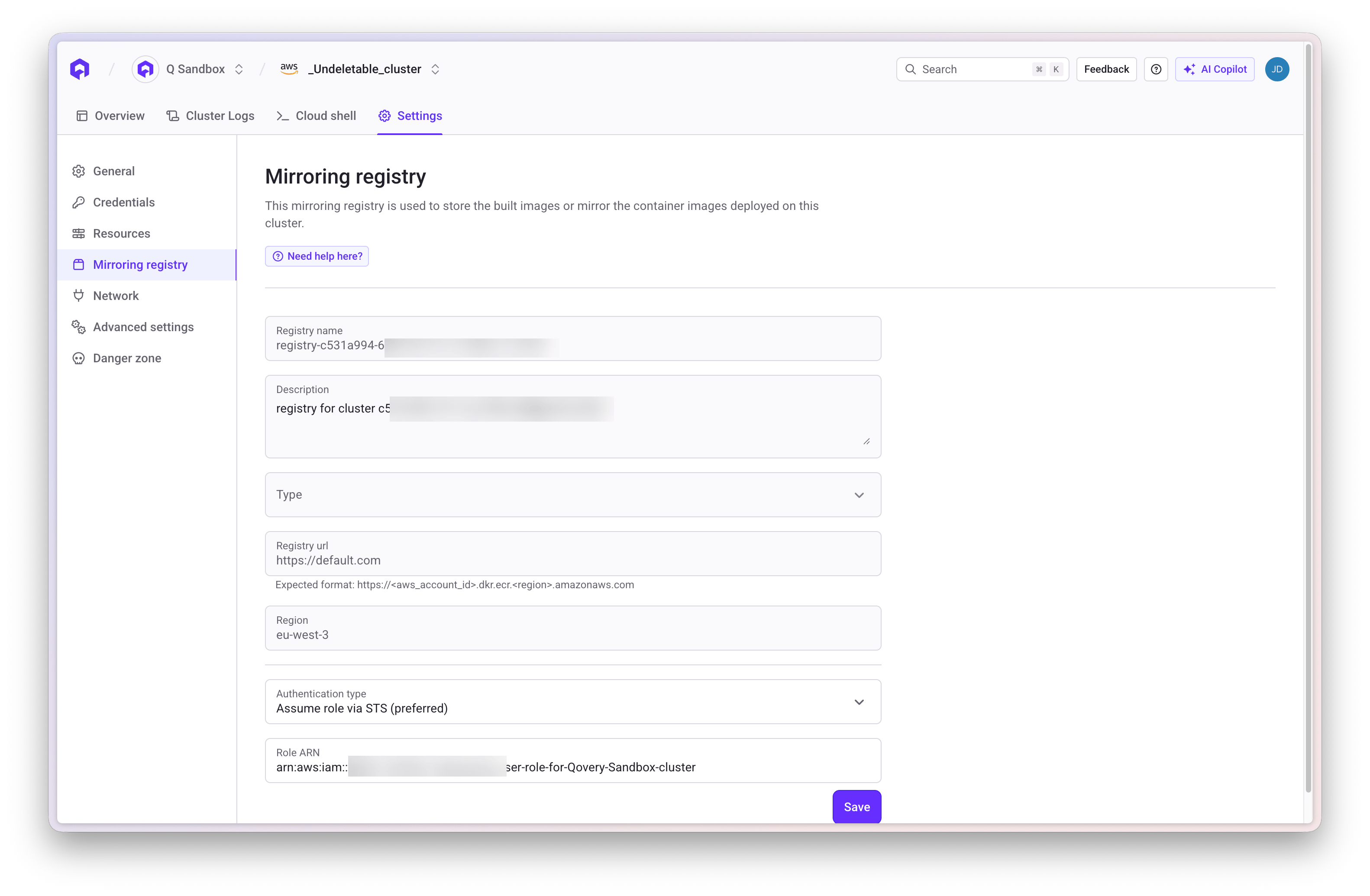
The mirroring registry is accessible and configurable through the Qovery interface under the “Mirroring registry” section of your cluster.For Applications Built by Qovery CI
When Qovery builds your application from Git: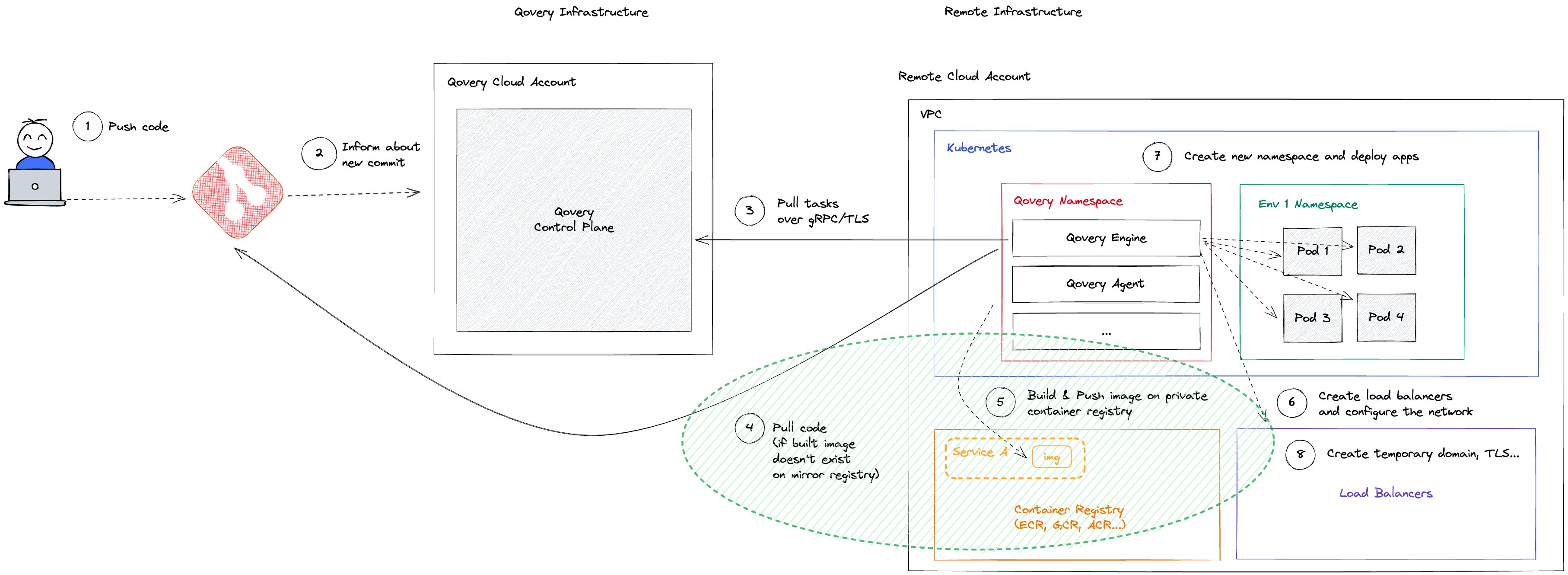
- After building, Qovery CI pushes the generated image to the mirroring registry
- Images are organized by Git repository with naming:
z<short_cluster_id>-git_repo_name - Qovery computes an image tag from the build inputs
- Before cloning and again after reading the Dockerfile, Qovery checks whether that exact tag already exists
- If the tag exists and the build is not forced, the Docker build is skipped and the existing image is used
- Unused images are automatically deleted when no longer referenced
- Remote cache functionality (AWS, GCP, Scaleway) rebuilds only changed layers
When Is the Docker Image Rebuilt?
Qovery reuses an image only when the generated tag already exists in the target registry. The tag is based on the inputs that can change the image:- Git commit ID and repository root path
- Dockerfile path and content
- Values of build arguments declared by the Dockerfile
- Values of build secrets referenced by
RUN --mount=type=secret,id=... - Target build stage
- Injected files, including their paths and contents
- Inline Dockerfile fragments, or the path of a file-based fragment
- Whether Git submodules are skipped
ARG values or secret mount IDs do not affect the final
tag.
The engine performs two image-existence checks. The first uses the inputs
available before the repository is cloned. The second parses the Dockerfile,
keeps only the arguments and secrets it actually declares, and computes the
final tag. An incomplete or incorrect tag_build_args selection can therefore
cause the first check to miss an image even when the final tag is reusable.
This image-reuse check is different from Docker layer caching. Disabling
build.disable_buildkit_cache disables registry layer-cache import/export; it
does not force a rebuild when the generated image tag already exists. Secret
values change the image tag, but BuildKit may still reuse layers from a step
that consumes a secret because secret values are not part of BuildKit’s layer
cache key.
force_build bypasses the initial check, but the post-Dockerfile check can
still skip the build if the final tag exists. The lookup is performed for the
generated tag, not for latest.
For Applications from Third-Party Registries
The behavior depends on the configured mirroring mode:Service Mode (Default)
Each service maintains its own mirroring repository.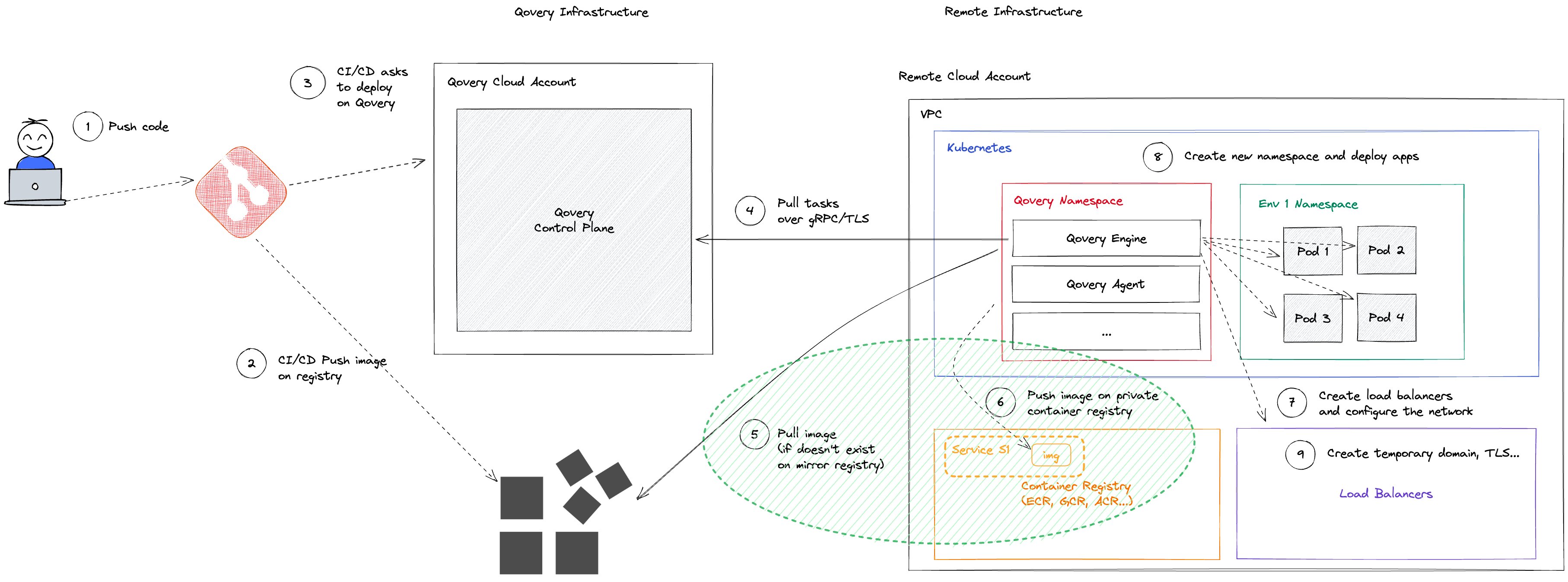
- Images are organized per Qovery service (isolated processes)
- Automatic cleanup when images become unnecessary
- Downside: Identical images across services are mirrored multiple times
Cluster Mode
All applications on the same cluster share one mirroring repository.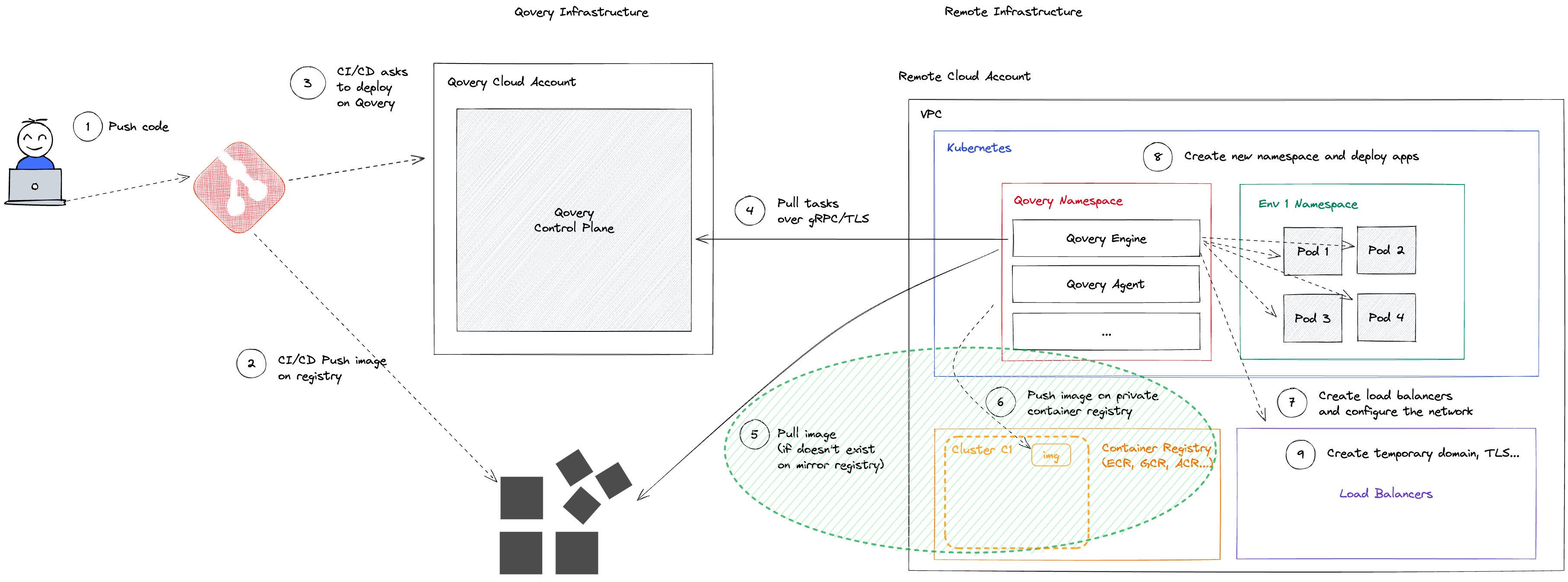
- Reduces duplication for shared images across environments
- Requires manual image management via TTL settings
- Not available on Scaleway
Important: Use Unique Image Tags
Using tags likelatest or other mutable tags can cause serious issues because the cached image in the mirroring registry may not be updated when you push a new version with the same tag.
Best practices:
- Use specific version tags:
myapp:v1.2.3,myapp:commit-abc123 - Use immutable digests:
myapp@sha256:abc123... - Avoid mutable tags like
latest,stable, orprod
Disabling Mirroring
Push Images to the Mirroring Registry
To skip mirroring operations, you can push your built images directly into the mirroring registry within repositories that match your image names. Alternatively, if the source registry URL matches the cluster registry URL, mirroring is automatically skipped. Example for AWS: For an imagenginx with cluster registry https://32432542.dkr.ecr.eu-west-3.amazonaws.com:
Push to: https://32432542.dkr.ecr.eu-west-3.amazonaws.com/nginx
Disable Mirroring on Scaleway Kapsule
On Scaleway Kapsule clusters, you can turn mirroring off so that pods pull images directly from the registry they are stored in. Images are no longer copied into the cluster’s Scaleway Container Registry, and deployments no longer depend on it being available. This applies to containers and jobs that deploy an image from a container registry. Applications and jobs built from Git are not affected: Qovery keeps pushing the images it builds to the cluster’s Scaleway Container Registry.Requirements
- A Scaleway Kapsule cluster managed by Qovery. The setting is rejected on other cluster types.
- The image’s registry is declared in your organization’s container registries. For a private registry, its credentials must be able to read the image; public registries work without credentials. Qovery only pulls from the registry; it never pushes to it or deletes from it. For GitHub Container Registry, a token with the
read:packagesscope is enough (see GitHub Container Registry). - The registry uses long-lived credentials and an
https://URL without a path. The table below lists which registries are pulled directly.
Images that are still mirrored follow the Service Mode behavior, and the deployment logs say why.
Steps
1
Declare the registry in your organization
Add the registry your images are stored in to your organization, with credentials that can read the images. See Container Registry. Skip this step if your services already deploy from it.
2
Set the mirroring mode to Disabled
In the cluster’s Settings > Advanced Settings, set
registry.mirroring_mode to Disabled and save.With Terraform, set it in advanced_settings_json on the qovery_cluster resource:3
Redeploy your services
Each container and job switches on its next deployment. Redeploying the cluster is not needed for this setting. Running pods keep their current image until their service is redeployed.
What Changes
- Pods run the image from its original registry (for example
ghcr.io/my-org/my-app:1.2.3), with a pull secret built from the credentials of that registry in Qovery. - Before starting the pods, the deployment logs in to the registry and checks that the image exists:
- Invalid credentials fail the deployment with
Failed to login to registry. - A missing tag, or an image the credentials cannot read, fails the deployment with
SOURCE_IMAGE_NOT_FOUND. - If the registry cannot be reached at that moment (network error, rate limit, outage), the deployment continues with a warning and Kubernetes retries the pull.
- Invalid credentials fail the deployment with
- The deployment logs show
Skipping image mirroring: mirroring is disabled on the cluster, pods pull <image> directly.
Things to Know
- Docker Hub rate limits: each node pulls from Docker Hub with the registry’s credentials, and anonymous pulls are limited per IP address. Add your Docker Hub credentials to the registry to pull directly with your own account. Without them, images are mirrored with Qovery’s Docker Hub account when one is available, and pulled anonymously otherwise.
- Unique image tags remain required. See Use Unique Image Tags.
- Switching back: set
registry.mirroring_modetoServiceand redeploy your services. Theqovery-mirror-*repositories stay in the Scaleway Container Registry, but a service’s previously mirrored tag is deleted on its first deployment with mirroring disabled, so switching back mirrors the images again.
Image Retention Policy
Configurable TTL (Time To Live) settings control image retention duration via the advanced settingimage_retention_time.
Modifications to the retention policy only affect newly created repositories. Existing repositories remain unchanged.
Next Steps
Deployment Pipeline
Configure deployment stages
Deployment Strategies
Choose deployment strategy
Container Registry
Configure container registries
Deployment Actions
Manage deployment lifecycle